Does Google Search Console Show AI Overviews and AI Mode?
Yes: Search Console counts AI Overviews and AI Mode in Web search, and its AI report shows your link impressions, but no queries or brand mentions.
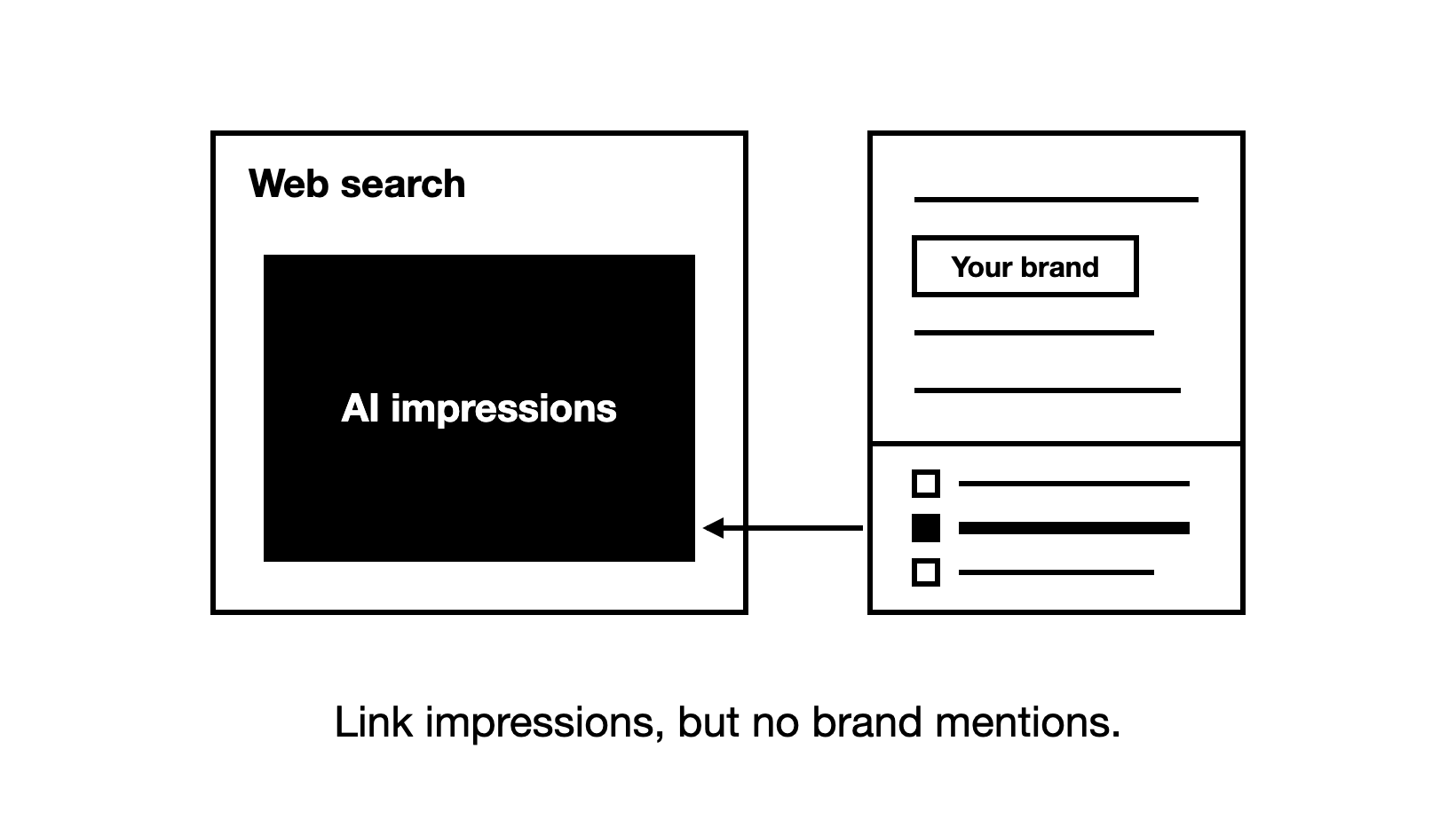
Yes: Search Console counts AI Overviews and AI Mode in Web search and shows your link impressions in a separate AI report, but not which answers cited or named you.
AI Overviews are the AI summaries Google places at the top of some search results, with links to the pages they draw on. AI Mode is Google's separate, chat-style search mode, built for questions that need more exploration, reasoning or comparison. It is closer to ChatGPT than to AI Overviews, so measure it on its own.
What does Google Search Console show for AI Overviews and AI Mode?
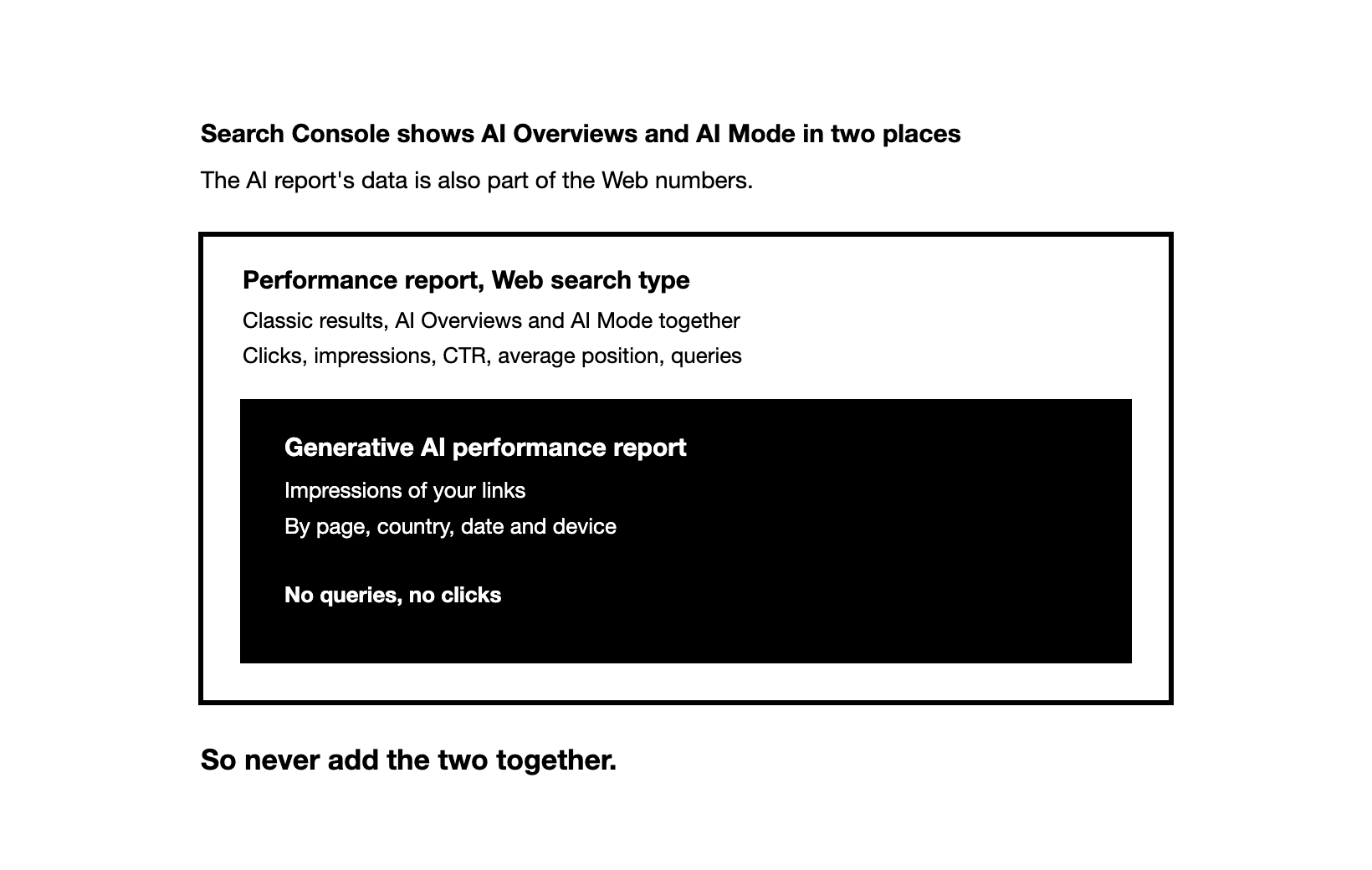
Search Console shows AI Overviews and AI Mode in two places. The first is the Performance report you already use. Google reports them within the Web search type, mixed with classic results. Its clicks, impressions, click-through rate (CTR, clicks divided by impressions) and average position all include them.
The second is the Generative AI performance report. Google announced it on 3 June 2026 for a subset of sites and had rolled it out to all websites worldwide by 31 August 2026. It counts impressions only: each time a link to your site was shown to a user in AI Overviews or AI Mode.
Each of those links is a citation: a page an AI answer shows as a source for what it says. A citation can be your own page, a third-party page (a competitor's page, a listicle, etc.) or a community page (a Reddit thread, a forum post, etc.). The report counts only your own pages.
| Performance report, Web search type | Generative AI performance report | |
|---|---|---|
| What it covers | Your Google Search results, classic and AI together | Your links shown in AI Overviews and AI Mode |
| Metrics | Clicks, impressions, CTR, average position | Impressions |
| Breakdowns | Queries, pages, countries, devices, dates | Pages, countries, dates, devices |
The AI report's data is also part of the Web numbers in the main report, as Search Console Help explains, so never add the two together. Because the AI report has no queries, it shows which of your pages appeared in AI Overviews or AI Mode, but not for which searches.
Where do you find AI Overview and AI Mode data in Search Console?
To track AI Mode and AI Overviews in Search Console, open your property and go to Performance.
- For clicks and queries, open the Search results report and leave the search type on Web, the default. Its Queries and Pages tabs list the searches that bring people to your site and the pages they reach.
- For impressions of your links in AI Overviews and AI Mode, open the Generative AI performance report in the same Performance section.
- For the searches behind one page, filter the Search results report to that page, with the same dates as the Generative AI report. Its queries are the searches that page appeared for, classic and AI results together.
You will not find an AI Overviews or AI Mode filter in the main report, either as a search type or under Search appearance.
How do you read AI Overview impressions, clicks and CTR in Search Console?
Read a page's CTR with the Generative AI report open. Say a page starts to appear in AI Overviews for searches where it was not shown before, and its clicks stay the same. Those impressions count in the Web report too, so the page's CTR falls. Nothing got worse in classic results.
Buyers rarely click citations, but engines use the cited pages to decide which brands to name. So a page with many AI impressions and few clicks still shapes the answers it is cited in. Before you rewrite or remove a page for a low CTR, check its AI impressions.
If a page's AI impressions fall, check whether your brand also dropped out of the answers that used to cite it. Step 5 of the traffic-drop check below shows how.
Under Google's counting rules, every link in an AI Overview gets the same position: the position of the AI Overview itself. We looked at data from the Zadoosh data platform for August and September 2026, B2B brands across software and other fields. In answers that cited at least one page, AI Overviews cited about 7 pages per answer. So the average position cannot tell you whether your link came first or last among them.
Some buyers also come back later. They read your name in an AI Overview, then search for your brand or type your address. That visit counts as a branded query or as direct traffic, not as a click from the AI Overview.
What does Search Console not show about AI Overviews and AI Mode?
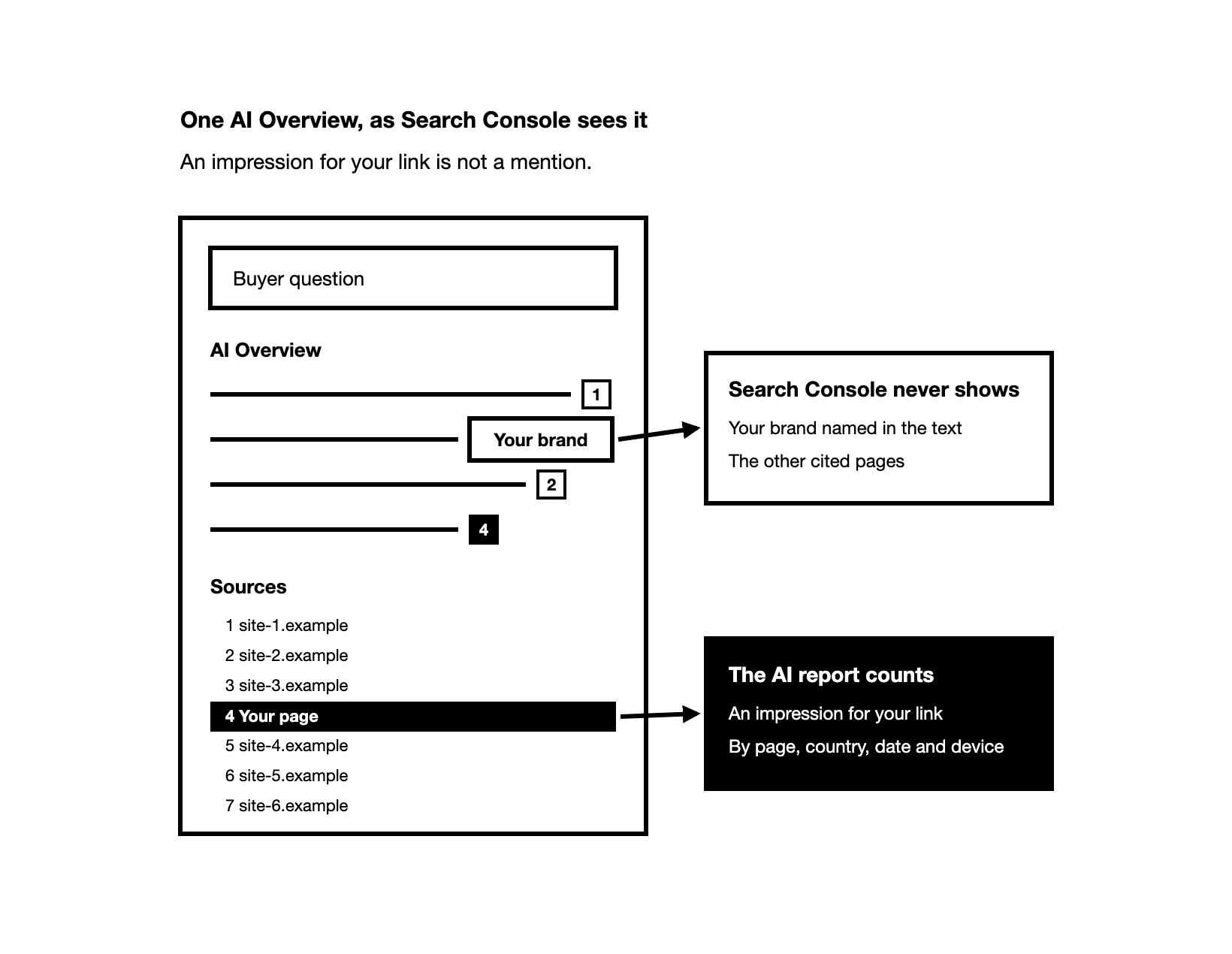
Search Console has no record of a mention, meaning your brand named in the text of an answer. Say an AI Overview names your product but links only to a review site. Search Console records nothing for you, because no link to your site was shown.
In our data, a mention and a cited page of the brand did not always go together. We looked at answers that showed sources, June to October 2026, B2B brands across software and other fields. AI Overviews named the brand without citing one of its pages in about 11% of answers, and cited one of its pages without naming it in about 11%. AI Mode named the brand without citing its pages in 5.8% of answers, and cited one of its pages without naming it in 17.5%.
When an answer cites your page without naming you, Search Console still counts an impression. So a rise in AI impressions does not mean AI answers name you more often.
Your own pages are also a small part of what AI answers cite. Our data here covers June to October 2026, B2B brands across software and other fields. The brand's own pages were about 8% of the pages AI Overviews cited, and about 7% in AI Mode. Search Console never shows the rest, the third-party and community pages, so it cannot tell you who is cited instead of you.
Search Console also sees only Google. Its AI report says nothing about ChatGPT, Perplexity, Copilot or the Gemini app. Each engine picks its own pages to cite, so strong AI Overviews impressions do not mean ChatGPT cites your pages. Each engine needs its own runs of the same prompts: the buyer questions you put to every engine you track.
Search Console still helps you choose what to track in those engines. The long tail of its Queries tab, the long and specific searches people run, shows how your buyers word their questions. Rewrite the searches that fit your buyers as prompts (how to choose which prompts to track).
For Copilot, Bing Webmaster Tools has a similar AI Performance report. It shows how often your content is cited in Copilot and in Bing's AI summaries, and a sample of the phrases the AI searched with when it cited you.
Mentions take a separate step: you run the prompts in each engine and read the answers. Keep your branded queries from the Web report next to the share of your tracked answers that name you. A rise in both is a directional sign that AI answers are sending buyers your way.
How to measure your brand in AI Overviews and AI Mode walks through the tracking for Google. As of November 2026, the Zadoosh AEO platform's free trial runs 25 prompts for 7 days, no card, across AI Overviews, AI Mode, ChatGPT, Gemini, Perplexity and Copilot.
Is your traffic drop really caused by AI Overviews?
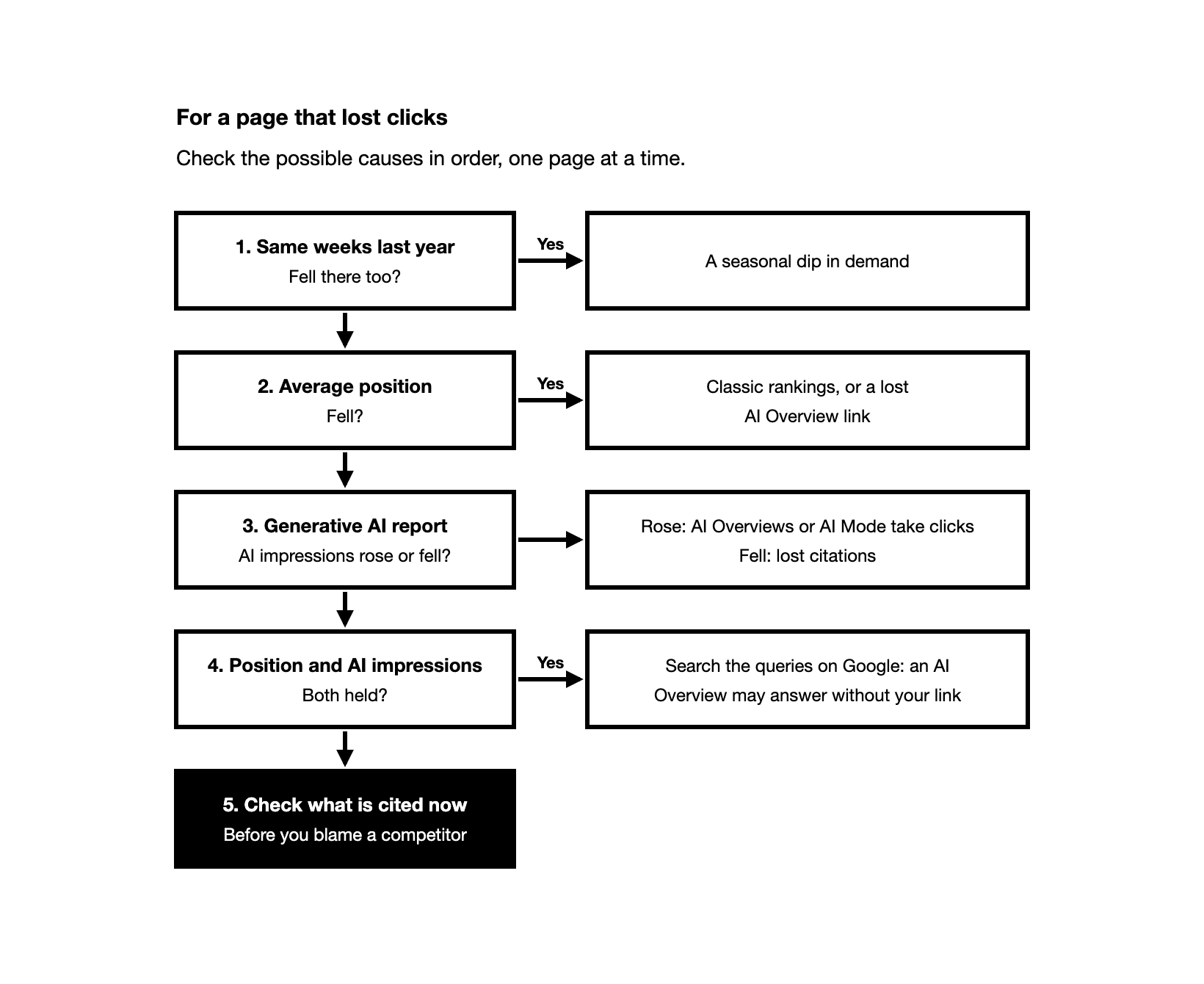
Search Console cannot show the cause directly, because AI Overviews, AI Mode and classic results share the same Web numbers. So check the possible causes in order, one page at a time.
How do you check a traffic drop against AI Overviews in Search Console?
- Find the pages that lost clicks. In the Web report, compare the last four weeks with the four weeks before. Then compare them with the same weeks last year, to rule out a seasonal dip in demand.
- Check their average position. A fall can mean a classic ranking problem. But a page also loses the AI Overview's position when an AI Overview near the top stops linking it. So read step 3 before you decide.
- Check the same pages in the Generative AI report. If a page's AI impressions rose while its clicks fell, AI Overviews or AI Mode are the likely cause: your link is shown, and fewer people need to click. If its AI impressions fell, AI Overviews or AI Mode link it less often, and you may have lost citations.
- If position and AI impressions both held, look above your result. An AI Overview may now answer those searches without linking your page, and Search Console shows only your lower CTR. Search the page's top queries on Google, signed out and from your buyers' country, since Google Search uses your location. Do it 4 to 5 times over a few days, because AI answers change from run to run.
- Check what is cited now. If you track these searches as prompts, compare what AI Overviews cited before the drop with what they cite now. Did the page that brought your brand into the answer drop out? Then check the density of what is cited now: the share of cited pages that mention your brand (4 of 10 cited pages is a density of 4 in 10). Do this before you blame a competitor.
Set the Generative AI report's date range to cover the drop, and see what it shows for those weeks.
How do you tell a real drop in AI Overviews from noise?
AI answers change from day to day, so one lost citation or one weak week can be noise. Say your brand is named in 40% of the AI Overviews answers you track one week, and in 34% the next. That 6-point fall is too small to act on yet.
We measured how far weekly visibility moves on its own, where visibility is the share of tracked answers that name your brand. For AI Overviews, a weekly change needed about 10 points before it was likely to be real (June to October 2026, B2B brands across software and other fields). That bar is rough, because those prompt sets were smaller.
Our rule comes from the ChatGPT part of the same data, March to October 2026. There, under 100 answers a week, no weekly change could be told from noise.
So act on a weekly change of about 10 points or more when your prompt set has 100 or more answers a week. Read smaller moves over a month. For the general method, see how to tell a real change in AI visibility from noise.
How do you measure the effect of AI Overviews on leads and sales?
Google Analytics 4 (GA4) does not separate AI Overviews traffic either. It counts visits from AI Overviews and AI Mode as Organic Search, and its AI Assistant channel leaves them out. So you cannot pull the leads that came from AI Overviews out of either tool.
Ask your buyers instead. Add a "How did you hear about us?" field to your demo or contact form, and ask on sales calls. Then watch whether replies that name AI search rise over the months. Read it as a directional signal, because buyers sometimes name the wrong source, such as "Google" for a ChatGPT answer.
Visitors who click through from AI assistants such as ChatGPT may be worth more per visit. In Seer Interactive's case study of one B2B software client, visitors from ChatGPT converted at 15.9%, against 1.76% from Google Organic (GA4 data, October 2024 to April 2025). Under GA4's channel rule, any AI Overviews clicks in that study would count as Google Organic, so the study tells you nothing about AI Overviews visitors.
How do you explain an AI Overviews drop to leadership?
You have no record of the AI answers your buyers saw. So present the cause your traffic-drop check found, with the Search Console numbers behind it. Show the pages that lost clicks, and whether their AI impressions held, rose or fell.
If those pages lost citations, show which kind of page is cited instead. In your tracked answers, compare the share of cited pages from your own site, from community pages and from third-party pages, before and after the drop. The group whose share grew is the likely cause.
Show the pages you created or worked on that started being cited. That is an early, clear sign that your work is paying off. For your own pages, the Generative AI report's page list shows it. For third-party and community pages, your tracked answers show it.
Then explain that AI visibility sits between performance and brand marketing. Unlike a paid click, a mention has no exact dollar value, but its trend can still be measured. Give AI visibility its own monthly section next to the SEO numbers leadership already sees, with your visibility against your top competitors (what an AI visibility report should include). Set directional targets, such as a closing gap to those competitors over a quarter, not a fixed percentage.
How should you use Search Console's AI Overview and AI Mode data each month?
Keep a monthly record of the Generative AI report by page, with each page's Web clicks beside it. Read it for the countries you sell in, since a total across all countries can hide a fall in your own market. After a few months, the record shows which pages Google keeps showing in AI Overviews and AI Mode, and which ones it stopped using.
Then study the pages that get both AI impressions and plenty of clicks. Ask what they give a reader that the AI answer does not, such as first-hand data, a tool or a worked example. Bring that to the pages that are shown but rarely clicked. For the full method across every engine, see how to measure AI search visibility.
Frequently asked questions
Can Search Console show AI Mode apart from AI Overviews? No. Both count inside the Web search type, and the Generative AI performance report counts them together, with no split between the two. They are different products, so track your prompts in each and read them as two numbers, as how to measure your brand in AI Overviews and AI Mode explains.
Does a click in AI Mode count as a normal click in Search Console? Yes, when it takes the user to your site. Under Google's counting rules, a click on a link to an external page in AI Mode counts as a click, and position follows the same method as a normal results page.
Does a follow-up question in AI Mode count as a new query in Search Console? Yes. Google counts a follow-up question in AI Mode as a new query (Search Console Help). So a query in your Web report may be a follow-up typed inside an AI Mode conversation, not a first search.
Where does Google AI Mode get its information? From Google Search. To be shown as a supporting link in AI Overviews or AI Mode, a page must be indexed and eligible to appear in Google Search with a snippet, as Google Search Central says. So a page that Search Console shows as not indexed cannot be linked in either. Both may also use query fan-out: Google issues more than one related search across subtopics and data sources to build one answer (more on query fan-out).