How to Choose Which Prompts to Track for AI Visibility
The prompts you track decide what your AI visibility number means. How to choose them: start from the buyer, write how buyers ask, keep branded ones apart.
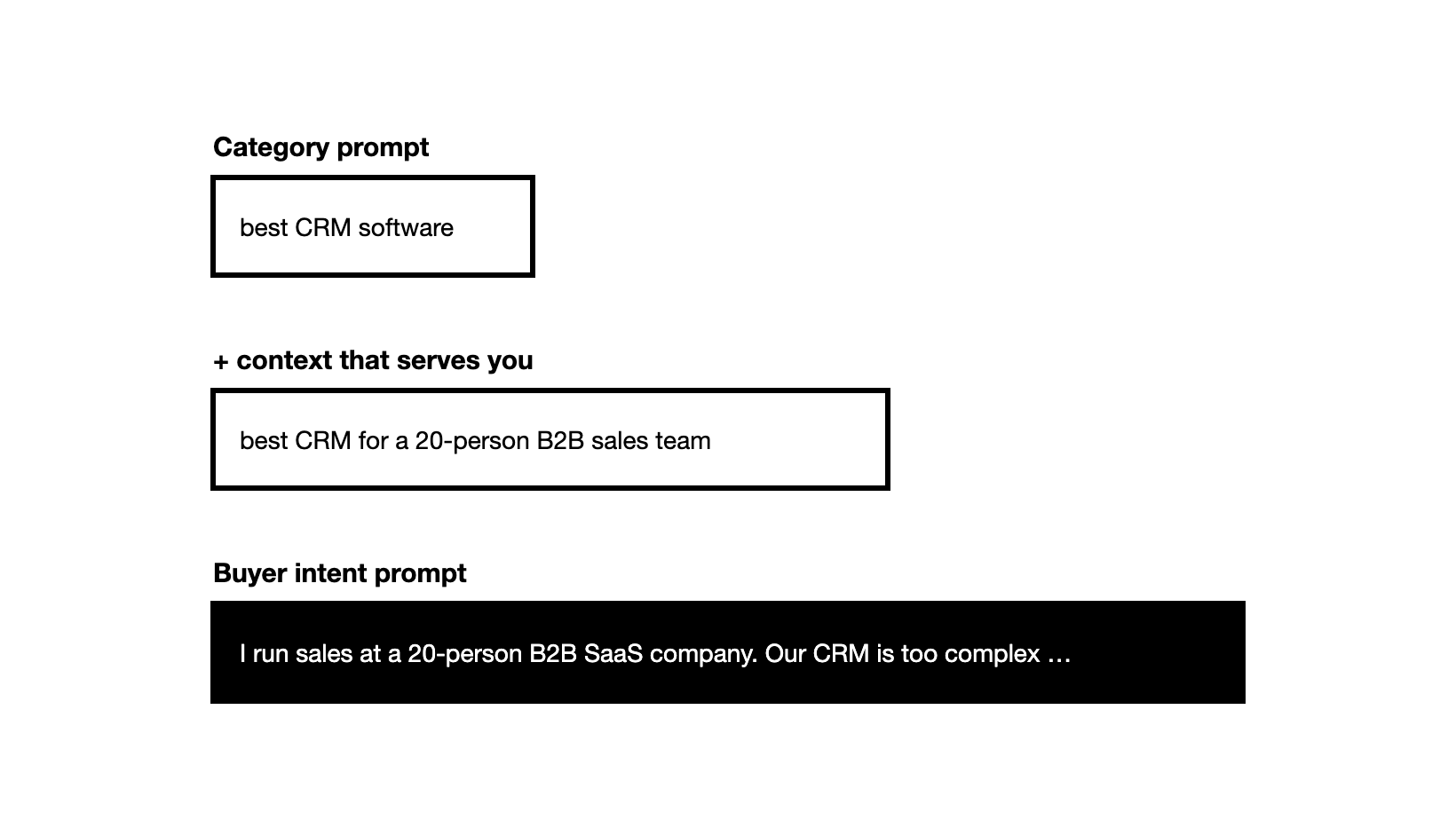
To choose which prompts to track for AI visibility, start with category prompts (the searches buyers already make), then add the context that matches the buyers you serve until you reach buyer intent prompts, keep prompts that name your brand in a separate group, and start with 20 to 30.
This guide is part of our guide to measuring AI visibility.
What is prompt tracking?
Prompt tracking means asking AI engines such as ChatGPT, Gemini, Perplexity and Google AI Overviews the same set of questions again and again, and recording whether each answer names your brand, cites your pages and recommends you over competitors. The set of questions is your prompt set. Every AI visibility number you report is a share of answers to that set, so the set decides what the number means.
Why does the choice of prompts matter so much?
Because a visibility score answers only the questions you asked. The most common mistake we see is the wrong prompts. Informational questions such as "what is employee engagement?" get a definition and rarely name any brand, so they measure nothing; leave them out. And a set that never goes past broad category prompts tells you how you do in the category, not whether you show up for the buyers you actually serve.
Prompts that only test what AI says about you by name measure something else. We come back to them in Step 4.
Step 1: Who is the buyer you are tracking for?
Every prompt you track should be a question a real buyer asks an AI engine while looking for a product like yours. Before writing any, write down four things about your buyers:
- Segment: industry, company size, country.
- Persona: the roles that research and decide, such as a sales leader, a RevOps lead or a founder.
- Buying stage: working out what kind of tool they need, comparing options, replacing a tool they have, or ready to decide.
- What changes their priorities: price, speed of setup, a must-have integration, several countries.
Then write one or two sentences on what you sell and what you do not. Keep only prompts your brand could legitimately win. If you sell a CRM but not the sales training around it, a prompt asking for "a partner to train my sales team and set up our CRM" will show a gap you can never close. Write the boundary into the prompt instead: the buyer says what they will handle themselves and what they need from a vendor.
Step 2: Where do real buyer questions come from?
No engine publishes how often a prompt is asked, so there is no prompt volume in the way there is keyword volume. Figures sold as prompt volume are estimates. Build the set from real buyer data instead:
- Sales calls and support conversations: how buyers describe the problem before they know your name.
- Your ideal customer profile: the situations that bring you your best customers.
- Google keyword data and the long tail in Search Console: the longer queries show the questions behind the short ones.
- Bing Webmaster Tools: its AI Performance report shows grounding queries, the phrases the AI searched for when it cited your pages.
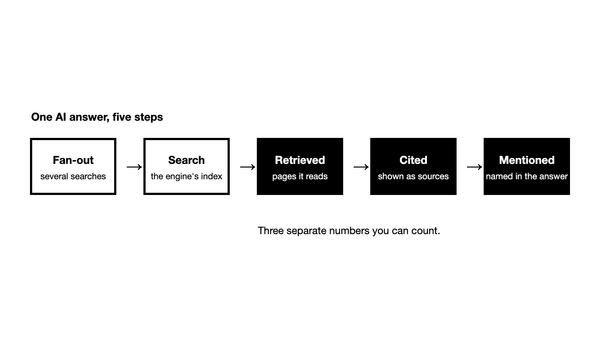
Keyword data is a starting point, not the prompt. An engine turns a prompt into its own searches: ChatGPT rewrites a question into one or more targeted queries when it searches the web, and Google's AI Overviews and AI Mode may run many related searches to build one answer. So "best CRM" as a keyword becomes a buyer's question in the prompt, with the buyer's context around it.
Step 3: How do you go from category prompts to buyer intent prompts?
Build the set in three moves: category prompts first, then context that serves you, then full buyer intent prompts. Each adds something the one before cannot tell you.
Start with category prompts
A category prompt is the search a buyer would type into Google, asked as a question: "What is the best employee engagement platform?" These are a good place to start. An engine works out the intent behind a question and runs its own searches before it answers: ChatGPT rewrites a question into one or more targeted queries, and Google's AI features may run many related searches for one answer. So rephrasing a category prompt as a longer sentence, with no new information, usually returns much the same brands.
Category prompts tell you how you do in the category as a whole. For a brand that is truly horizontal, serving every kind of buyer in the category, they may be most of what it needs.
Add context that serves you
A longer prompt is not a better prompt. Context is what changes the answer, and only context that matches the buyers you serve is worth adding: their segment, their role, a constraint your product meets. "What is the best employee engagement platform for a 300-person manufacturing company with mostly frontline staff?" tells you something the category prompt cannot, if frontline teams are who you sell to.
Our data agrees that length alone is not the point. In data from the Zadoosh data platform (March to October 2026, brands mostly in B2B software and services, about half of prompts tracked in the US), prompts that named no brand returned a similar brand share whether they were short or long. For a single brand it is a different story: among the brands tracking both, long prompts moved the share by more than 5 points for 6 in 10, up for some and down for others.
Graduate to buyer intent prompts
A buyer intent prompt is the question as your buyer would really put it, with who they are, what they need and what limits them. Buyers describe their situation, often over a chain of questions, and the engine may already know things about them; ChatGPT, for one, may use saved memories when it rewrites a search. A category prompt tells you how you do in the category; a buyer intent prompt tells you whether you show up for the exact segment you serve, where the buyers who convert are.
The context a buyer gives grows with the buying stage. Someone still working out what kind of tool they need has little to add; someone ready to buy describes their whole situation. Write each prompt with the context that stage really carries, and let the length follow:
| Buying stage | Context it carries | Example |
|---|---|---|
| Working out the category | the problem and one detail about them | "What kinds of tools do small B2B sales teams use to track deals once spreadsheets stop working?" |
| Replacing a tool | the tool they are leaving and why | "What are the best alternatives to [a competitor] for a 15-person team that sells mostly by email?" |
| Comparing options | who they are and what they compare on | "We are a 40-person B2B SaaS company choosing a CRM. Which options are easiest for reps to adopt, and how do they differ on email sync and pipeline reports?" |
| Ready to decide | who they are, the job, their constraints and the ask | "I run RevOps at a 120-person B2B SaaS company in the UK. We moved off spreadsheets last year and our current CRM is too complex for the sales team. We need Gmail sync and pipeline reports, under 50 dollars a seat, live within a month. Which CRMs would you shortlist, and how do they compare on ease of use?" |
Three rules keep the prompts honest:
- Never name your own brand. A buyer at this stage does not know you yet, and a prompt with your name in it gets your name back.
- Name at most one other vendor, and only as the tool being replaced. "How do [vendor A] and [vendor B] compare?" is a race you are not in: the engine answers about those two. Compare on a criterion instead, with the field left open.
- Spread the prompts evenly across the buying stages and personas, so one stage or one role does not carry the whole score.
What we see: products with sharp positioning tend to do well on buyer intent prompts, because the buyer's situation matches what they are known for. Broad products tend to do well on category prompts only when they lead their category or have done a lot of AEO work. So keep both in the set, and read them apart.
Our free Prompt Simulator drafts both from your domain: a quick set of category prompts, or buyer intent prompts for the segments, personas and buying stages you choose.
Step 4: What do you do with branded prompts?
A branded prompt names your brand: "Is [your brand] good for a small sales team?" It tells you how AI describes you when someone asks about you directly. That is a positioning question, not a visibility one, so keep these prompts out of your visibility share and report them on their own.
Most teams start with visibility, whether they show up at all, and move to positioning later: which words AI uses about them, and whether those match how they want to be known.
Step 5: Which prompts should you drop before you start?
Run each candidate prompt once and read the answer before it goes into the set. Drop it if:
- The answer names no product or company at all. "What is a CRM?" gets a definition, so there is nothing to win.
- It asks for something you do not sell. A gap you can never close only lowers the score (Step 1).
- It repeats another prompt in different words, with the same buyer and the same need. Keep the one closer to how buyers talk.
Keep it if a competitor is named and you are not: that is the gap the set exists to measure.
Step 6: How many prompts should you track?
Start with 20 to 30 prompts: a few core category prompts first, then widen to more segments, personas and jobs. A focused set you run often tells you more than a large set you run once.
Spread the first set so every group has enough prompts to read on its own. A starter set for a CRM sold to small B2B sales teams, split evenly across the buying stages, might look like this:
| Group | Prompts | What it tells you |
|---|---|---|
| Working out the category | 6 | Are you part of the answer before the buyer knows which tools exist? |
| Comparing options | 6 | Do you hold up when the buyer compares on what matters to them? |
| Replacing a tool | 6 | Do you appear when buyers look past a competitor? |
| Ready to decide, split across two personas | 6 | Are you on the shortlist when a buyer describes their whole situation? |
| Branded (reported apart) | 3 | How does AI describe you when asked directly? |
An agency follows the same rule per client: each client gets its own set, built from that client's buyers.
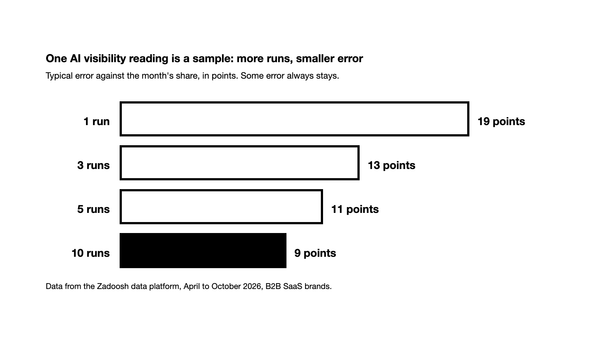
The number of runs matters as much as the number of prompts, because the same prompt gets different answers each time. In our data (April to September 2026, B2B SaaS brands), a single run came within 10 points of a brand's share for the month only about a third of the time. How many times to run each prompt is its own question.
Step 7: How should you set up prompt categories?
Put every prompt in a prompt category, so a weak spot shows up as a pattern rather than a single miss. Useful categories:
- Product area or use case: one group per thing you sell.
- Persona and segment: who is asking.
- Buying stage (intent): working out the category, comparing options, replacing a tool, ready to decide. Showing up for one says little about the others.
- Alternatives: prompts that name a competitor.
- Country and language: one group per market.
Run the same prompts on every engine you track. For a non-English market, keep the engines, set the country to that market and write the prompts in its language. For a local business, set the city or region too: ChatGPT can use location for local results.
Read each category on its own. An average across categories hides the one that matters: a strong score on category prompts can cover a gap on every buyer intent prompt for your core segment. In the Zadoosh AEO platform you give each prompt a category and filter the dashboard by it.
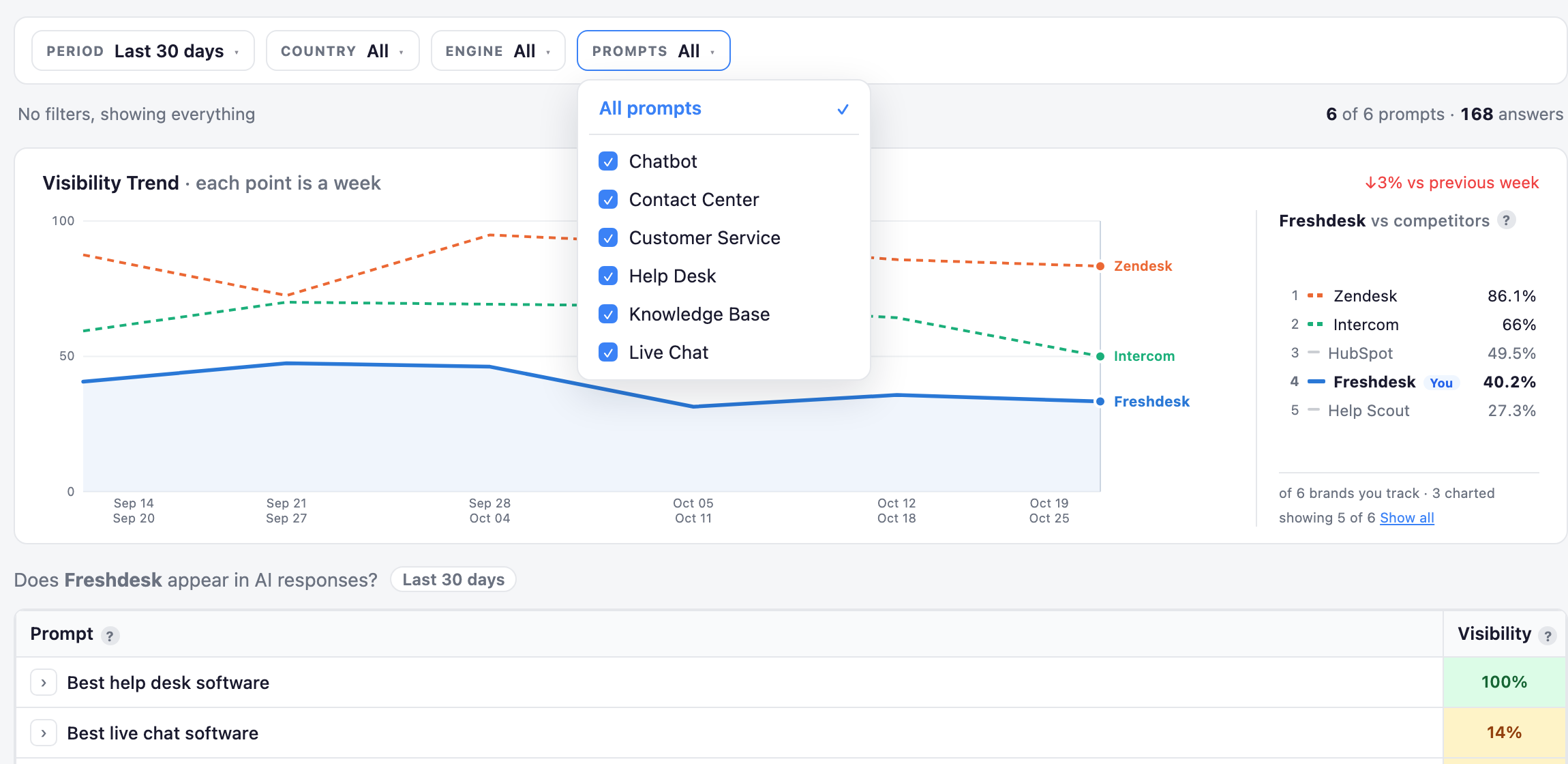
An example workspace for Freshdesk built from six of its AI Index categories, each one a prompt category. Choosing categories in the Prompts filter narrows the whole dashboard to them.
Step 8: How do you keep the set useful over time?
Add prompts whenever you find relevant ones: a new segment, a phrase from a sales call, a competitor that starts appearing. Remove a prompt only when you realise you were tracking the wrong thing. Every removal breaks the trend for that prompt, and the trend is what you act on.
Collect answers as often as you can, ideally daily with a tool, and set strategy from the trend over weeks, never from one week. Measuring AI visibility covers what to do with the numbers.
How do you avoid a prompt set that flatters you?
A prompt set can make a brand look better than it is without anyone meaning it to. Three ways it happens:
- Only prompts you already win. If every prompt came from the pages you rank for, the set measures your existing strengths. Add prompts where competitors are named and you are not; those are the gaps worth knowing about.
- Prompts that copy your own wording. A prompt that repeats the phrases on your site, or your product's feature names, invites the engine to answer with your name. Buyers describe their problem, not your feature list.
- Branded prompts mixed in. Covered in Step 4: they belong in their own group.
A simple test: show five prompts from the set to someone in sales. If they would not recognise them as things buyers say, rewrite them.
Should prompts stay fixed, or vary in wording?
Keep each prompt's wording fixed, so a change in the answer reflects the engine and not your edit. Small changes in wording can change which brands an engine names, so when a phrasing matters, add it as a separate prompt rather than editing the old one.
Prompt set checklist
- Every prompt is a question a buyer asks when looking for a solution like yours.
- Prompts come from sales calls, your customer profile, Search Console and Bing, not from guesses.
- The set starts with category prompts and moves to buyer intent prompts; each prompt carries the context its buying stage really has, and decision prompts carry who, the job, constraints and the ask.
- No prompt names your brand, and none puts two vendors head to head.
- Branded prompts sit in their own group.
- You start with 20 to 30 prompts and run each of them many times.
- Every prompt sits in a prompt category: product area, persona, buying stage, alternatives or market.
- You add prompts as you learn, and remove only the wrong ones.
Frequently asked questions
What is prompt tracking in AI search? Asking AI engines the same set of buyer questions repeatedly and recording whether each answer names, cites and recommends your brand. The set of questions decides what your visibility number means.
How many prompts should I track for AI visibility? Start with 20 to 30 buyer prompts, then widen as you learn. Run each one many times, because a single answer is not a reliable read.
Should I track branded or unbranded prompts? Both, but apart. Unbranded prompts measure whether you show up when buyers look for a solution. Branded prompts show how AI describes you, which is a positioning check.
Can I use my SEO keywords as AI prompts? Yes, as category prompts: a keyword asked as a question works fine and shows how you do in the category. Then add the context that matches your buyers, and move to buyer intent prompts for the segments you serve.
Is there prompt volume data like keyword search volume? No engine publishes how often a prompt is asked, so any prompt volume figure is an estimate. Real buyer data from sales calls, Search Console and Bing is a better guide.
How often should I change my prompt set? Add prompts whenever you find relevant ones, and remove a prompt only if it was tracking the wrong thing. A stable set keeps the trend readable.